If success begins in the mind, then Trello is the mental gym I didn’t know I needed. As someone balancing personal, work and school projects, I was looking for a project management tool that was simple to use, visually clear, and flexible enough to support my workflow. After a recommendation from Professor Hastings and exploring options like Asana, Podio, and Trello, the choice was clear.
Why Trello Immediately Stood Out to Me
Visual Layout
- Trello’s clean, visual interface makes project management feel less overwhelming and more organized.
Board Structure
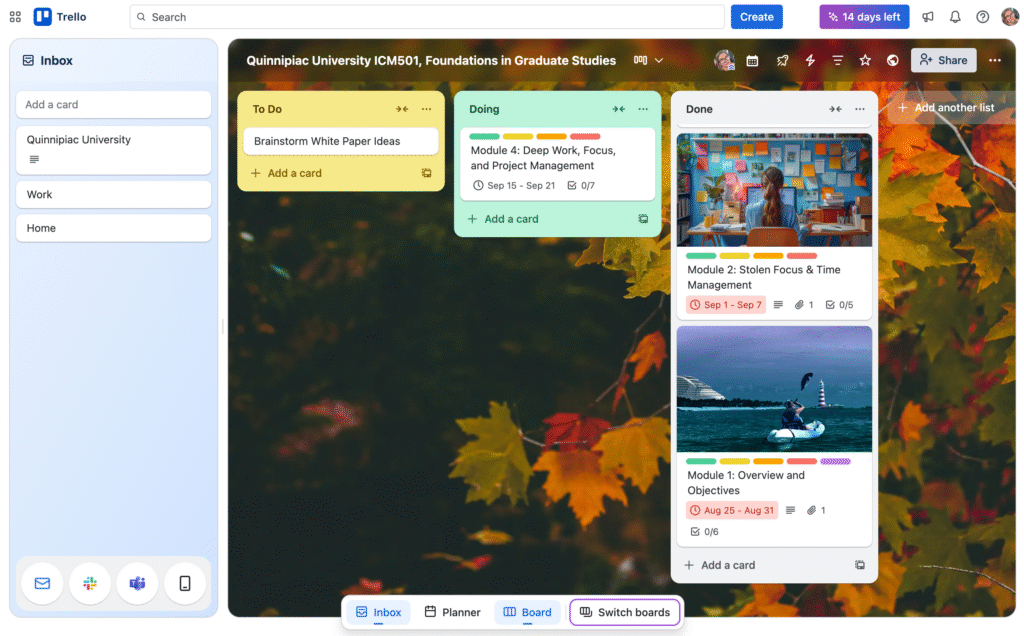
- Boards act as individual projects.
- Lists represent workflow stages like “To Do,” “Doing,” and “Done.”
- Cards are individual tasks that can be moved between lists as progress happens.
User-Friendly Interface
- Smooth drag-and-drop functionality.
- Intuitive design that’s easy to navigate.
- Highly customizable to fit your workflow.
Customization Options
- Change each board’s background.
- Adjust visibility settings (private, team, public).
- Star favorite boards to keep them easily accessible.
Collaboration Features
- Great for both solo use and team collaboration.
- Simple tools for sharing and assigning tasks.
Getting Started with Trello
One of the resources that helped me was a video called The Ultimate Trello Tutorial (Beginner’s Guide) by Karl Jacobson from The Viable Coach. He breaks down how to set up your workspace, invite others, and build your first board. His explanation made it easy to understand how Trello works without feeling overwhelmed.
Trello also offers templates that help you get started quickly. When you open a card, you’ll find options to assign members, add checklists, set deadlines, attach files, and write comments. If you work with teams, this keeps communication clear and organized. You can even duplicate cards for recurring tasks, which saves time.
There are also Power-Ups, which let you integrate other apps or enable features like a calendar view. While some are limited to paid plans, Trello offers a 14-day free trial with no credit card required, which makes it easy to explore what’s possible.
Comparing Trello, Podio, and Asana
Podio is great for businesses with complex needs, but it comes with a steep learning curve and more features than I needed. Asana is strong on structured workflows and team-based task management, but it lacks the visual interface that makes Trello so approachable. As a graphic designer, I naturally lean toward tools that give me a clear visual overview, which is exactly what Trello provides.
In the end, Trello helps me stay focused, organized, and motivated. It’s more than just a project management app, it’s a tool that supports the way I think and work.